If you mainly use Codex locally and run short on the usage included with your plan, you can switch to an API key. The billing is different: ChatGPT sign-in uses plan usage, while API requests are charged to an API account based on the model’s rates and token usage.
OpenAI currently includes Codex in plans such as Free and Go, with different limits by plan. With an API key, you can use the OpenAI API or configure another provider. Codex CLI can also connect to local models. Choose based on the features you need and how you want to pay.
| Setup | Where charges appear | A good fit when |
|---|---|---|
| ChatGPT account | Codex usage included with your ChatGPT plan | The included usage is enough, or you need account-based features |
| OpenAI API key | Your OpenAI API account, at model rates | You mainly use Codex locally and want usage-based billing |
| Another provider’s API key | That provider’s account and rates | You want to use a different model service |
| Local model in Codex CLI | Usually no hosted API bill; uses your own hardware | You’re willing to set up and maintain a local model |
An OpenAI API key and a third-party API key are different: one sends requests to OpenAI, the other to the provider you configure. API usage does not draw from your ChatGPT plan. If you need Codex Cloud or workspace features, check whether they require ChatGPT sign-in.
Estimating API costs
Look up the model’s input and output rates, then apply them to your usage:
Cost = input tokens ÷ 1,000,000 × input rate
     + output tokens ÷ 1,000,000 × output rate
     + other billable items
For example, a task with 50,000 input tokens and 10,000 output tokens costs 0.05 × input rate + 0.01 × output rate. This only shows the calculation; Codex doesn’t use a fixed number of tokens per task. Long conversations, repeated edits, and tool calls can increase usage. Check the model’s pricing page for how it bills cached tokens or request fees.
There is no fixed conversion from a plan allowance to a number of API tokens. Usage depends on the model, context, and task. Instead of dividing a monthly plan price by a token rate, track the usage, outcome, and cost of a few typical tasks, then estimate your monthly spend.
Configuring another provider
Codex supports custom providers in its configuration file. When you edit it yourself, match the API endpoint, model name, and key. You’ll also need to restore the previous settings if you switch back.
Install Codex, then get UnifyLLM Desktop from the download page. Desktop puts these settings in a graphical interface. Select Codex, enter a UnifyLLM API key and an available model, then choose Save & Activate. When the card shows Active, fully quit and reopen Codex. Send a small request to check the response, then review the usage logs.
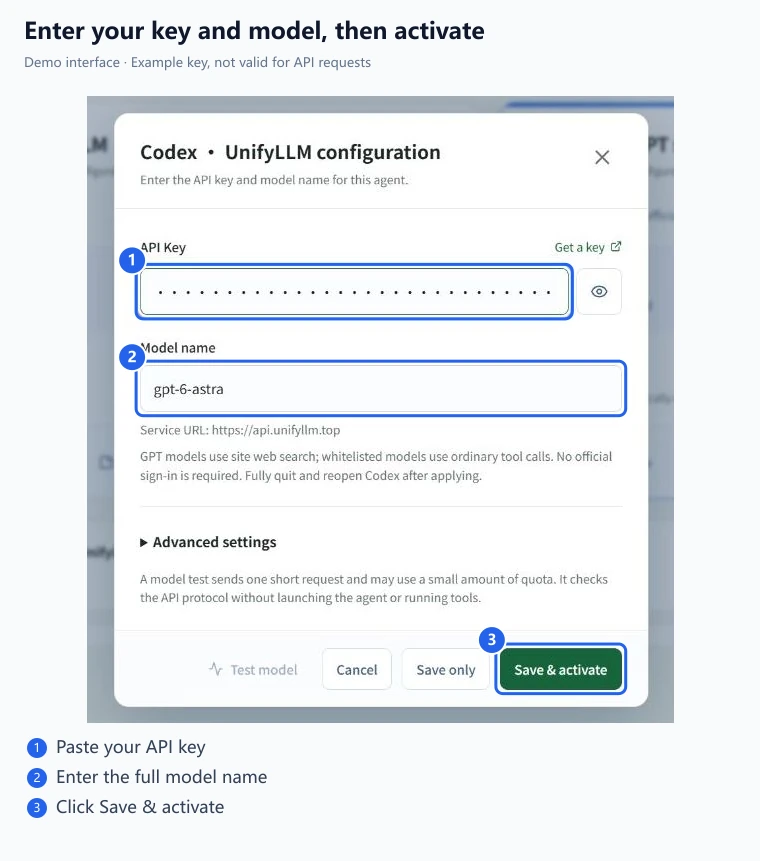
The configuration screen uses demo data. Enter your own key and an available model ID.
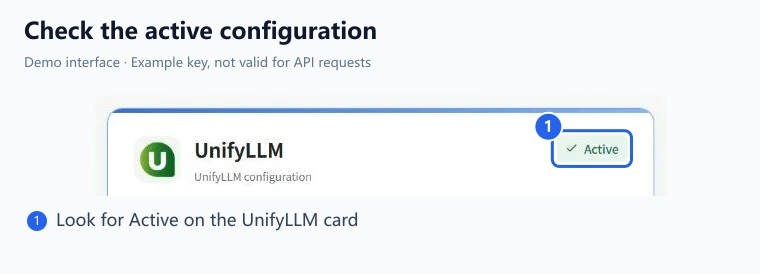
Once the card shows Active, fully quit and reopen Codex.
Desktop backs up the previous configuration so you can switch back later. It manages local connection settings; Codex still performs the coding work, and the selected provider bills the requests. The API key is stored in Desktop’s local application configuration files, not the operating system keychain, so protect your computer account and those files on shared devices.
Model availability and rates can change. Check the current pricing page before setup, and follow the Desktop guide for the full steps. If you prefer editing TOML, use the Codex configuration docs.
Checked November 27, 2026. See OpenAI’s Codex plan guide for plan availability and the authentication docs for API-key sign-in.